
Our Reviews & Experiences


Home » MileIQ Alternatives » Timeero Overview
Last Updated: June 3, 2026
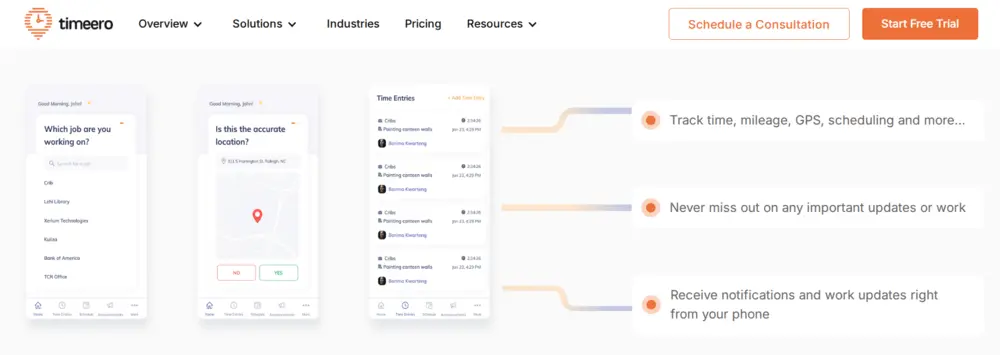
Timeero is a versatile time and mileage tracking software that helps businesses improve their workforce management. It has features ranging from real-time GPS tracking to streamlined payroll processes. It mostly caters to small and mid-sized businesses, field teams, and contractors. In this comprehensive Timeero review, we’ll explore its key features, pricing plans, and more. We will also introduce an alternative app better suited for mileage tracking.

Table of Contents
What is Timeero and Who is it For?
Timeero is a workforce visibility app, designed to manage field teams on the go. Businesses like construction, home healthcare, and field services find it very useful. It helps with time tracking, location monitoring, and mileage logging. Essentially, if your team works outside a traditional office, Timeero aims to simplify payroll, improve accountability, and keep you compliant.
Key Features of Timeero
In this app review, we will show you the most important features and price plans. Timeero’s key features include:
Employee Time Tracking
Timeero offers robust employee time tracking with options for clocking in and out through a mobile app. Timeero’s geofence technology, Auto Clock-In/Out, and facial recognition (available on the Kiosk app only) help eliminate missed punches, reduce time theft, and simplify payroll.
Employee GPS Tracking
Field teams can increase visibility and transparency across their workforce with real-time GPS tracking. The app’s “Who’s Working” dashboard displays the location of workers who are clocked in, as well as their current job. While driving, GPS breadcrumbs are dropped every 150 ft. for accurate mileage tracking. Timeero automatically tracks employees’ mileage when their driving speed reaches a predefined threshold. Mileage is recorded and attached to employees’ timecards, creating a documentation trail. The app continues to track mileage while offline, syncing mileage data with Timeero once connection is restored. Managers can customize reimbursement rates and export mileage totals for payroll.
Integrations
Timeero integrates with multiple payroll and accounting software systems:
- QuickBooks
- Gusto
- ADP
- Paycor
- Paychex
- Paylocity
- Xero
- Rippling
- Viventium
- PIMSY
- Zapier
- Sage Intact
Premium plans include a custom API for advanced requirements.
Additional Features
Additional capabilities include
- Scheduling
- Break Tracking
- California Breaks Tracker
- Auto Clock-In/Out
- Two-Way In-App Messaging
- Photo Attachments
- Facial Recognition Technology (available for iOS Kiosk App only)
- Segmented Tracking
These features enhance team communication and ensure accurate record-keeping. Learn how Timeero works from their short introductory video.
Pricing Plans for Timeero
Timeero provides a range of pricing plans designed to accommodate businesses of different sizes and needs.
| Plan | Price (per user/month) | Key Benefits |
|---|---|---|
| Basic | $6 (limited to 10 users) | Essential time, mileage, break and location tracking, ideal for small teams. |
| Pro | $9 | Adds advanced features like Auto Clock-In/Out, Job Tracking, Scheduling, Geofencing, California Break Tracking, Photo Attachments, and Integrations. |
| Premium | $12 | Everything in the Basic & Pro Plans, plus: Commute Mileage, Suggested Mileage, Public API, Signatures, Custom Fields, Time-Off Management, EVV, and Facial Recognition. |
| Enterprise | Custom | Tailored solutions for large organizations with specific needs. |
What Users Say about Timeero
Timeero’s ratings show a consistent positive user experience on both platforms: 4.6/5 on Google Play (538 reviews) and 4.7/5 on the App Store (1k reviews) as of June 1, 2026.
Positive Feedback of Timeero
- Responsive, human support that jumps in quickly and follows up until issues are resolved. Reviewers note that support is available via chat, phone, Zoom, and email.
- Easy time, mileage, and photo attachments (e.g., receipts) that simplify record-keeping.
- Users appreciate that the app integrates with payroll software, with one small business owner saying it “changed everything” for tracking employee mileage and noting the integration was seamless .
- The app provides accurate mileage readings for reimbursements, and running reports is straightforward with the ability to filter by job site, employees, dates, and individual tasks.
- Product improving over time with updates and a visible roadmap that users notice.
Negative Reviews
- Reviewers report map tracking suddenly crashing when replaying a user’s route, and other stability issues that interrupt workflow.
- Editing and notes limits: can’t edit after clock-out; notes disappearing after save.
- Some reporting features aren’t fully functional, and the app is built more for contract or service industry work, requiring adaptation for other use cases.
- The mobile app requires precise location access at all times, even when it isn’t open, which reviewers and testers flag as a significant privacy concern for employees.
- Beyond the video introduction, no additional onboarding assistance is provided — leaving users to figure things out on their own.
Overall impression
Users like Timeero for hands-on support and simple mileage + time tracking that ties neatly into reporting. Android users have experienced significant improvements, noting the jump in ratings from 3.1 to 4.6 on the Google Play Store. If your team is Android-heavy, test stability on a few devices first. Random logouts, battery drain, and 24/7 location permissions continue to be friction points. However, if your team is looking for an app with responsive customer support, real-time visibility, and reliable offline tracking, Timeero is a great fit.
If you are looking for a mileage tracker for individual use, you are better off with a mileage tracker like MileIQ.
Focus on Mileage Tracking: Crucial for Business Deductions
Timeero does a good job with mileage logging. It uses GPS to automatically record miles for your team. This is super helpful for accurate reimbursements and simplifying record-keeping for employees who drive for work. It’s a key feature for distributed teams where mileage can be a significant expense.
However, when it comes to maximizing your tax deductions for mileage, a specialized tool can offer a deeper level of detail and IRS compliance that general tracking apps might miss. Vehicle expenses, especially if you have a fleet or even just a few employees on the road, can add up to thousands of dollars in potential tax write-offs. This is where focusing on a solution built from the ground up for tax optimization comes into play.
MileageWise: Your Partner for Mileage Deductions
While Timeero handles team management well, MileageWise focuses solely on making the mileage logs of your employees IRS-proof and maximizing your tax deductions. We know that car expenses are a big deal for small businesses, and even larger companies with field workers. Our goal is to ensure you get every dollar you deserve back.
Mobile App for Team Mileage Tracking
- Automatic Trip Logging: Employees’ drives are tracked automatically, ensuring every mile is recorded accurately.
- Quick Employee Setup: Add drivers in minutes and assign vehicles or roles easily, minimizing admin work during onboarding.
- Ad-Free, Secure Platform: Keep company and client data private with no ads or data-sharing—just reliable tracking for business use.
- Flexible Distance Calculation: You can choose to pinpoint start and end locations with server-side calculations or real-time tracking to your liking.
- Smart Trip Modes: Drivers can switch between business and personal use with a single tap, keeping reports clean and IRS-compliant.
- Expense Tracking Compatibility: Sync mileage data with expense management systems for seamless reimbursement or payroll processing.
Team Management Dashboard
- Centralized Team Overview: View every driver’s activity, total mileage, and trip purpose in one easy-to-navigate dashboard.
- Automatic Mileage Reports: Generate IRS-compliant mileage summaries for each employee or the entire team in just a few clicks.
- Custom Roles & Permissions: Control who can edit trips, manage reports, or oversee different teams.
- Bulk Data Import: Upload team or client data in one go, saving hours of setup time.
- AI-Powered Trip Rebuild: Recover missing or untracked trips automatically to ensure accurate, audit-ready logs for every employee.
- Compliance & Audit Support: Built-in checks ensure all logs meet IRS standards and eliminate potential audit triggers.
Customer Support That Understands Business Needs
MileageWise’s support team knows how valuable your time is. Whether you’re onboarding new drivers, setting up your team dashboard, or preparing mileage reports, our experts are ready to help you every step of the way. You can always talk to real people who understand business operations. From setup to fine-tuning settings, our team ensures your mileage tracking runs smoothly so you can focus on managing your business.
Try MileageWise for free for 14 days. No credit card required!
Automatic Mileage Tracker App


From Timeero Frustrations to Smooth Tracking with MileageWise
I used to rely on Timeero for tracking my team’s mileage, but after recurring crashes and missing trips, I started looking for an alternative. Reading a few Timeero reviews, I realized I wasn’t alone—many business owners faced the same bugs and syncing issues.
That’s when I tried MileageWise, and the difference was immediate. The tracking runs reliably in the background, every trip is logged accurately, and the reports are IRS-compliant without extra work. My drivers can focus on their jobs instead of troubleshooting an app, and I finally have consistent, audit-ready logs I can trust. MileageWise turned mileage tracking from a daily hassle into a system that actually works for my business.
Conclusion: Make Your Mileage Count
We’ve covered a comprehensive Timeero Review, looking at its features, pricing, and user experiences. It’s a solid tool for managing mobile teams, especially for its time and location tracking. However, when it comes to maximizing your mileage tax deductions, a dedicated solution like MileageWise offers unparalleled advantages.
FAQ
Is Timeero reliable?
Timeero offers time and mileage tracking for teams, but user reviews mention mixed experiences. While some praise its customer service and reporting tools, others report frequent app crashes, syncing problems, and missing trips—especially on Android.
Can Timeero integrate with payroll or expense tools?
Yes, Timeero integrates with payroll and accounting systems like QuickBooks. However, several users report that syncing data can be inconsistent depending on device type and software version.
Can Timeero track employees while they’re offline / without an internet connection?
Yes — Timeero is designed to work offline. It will collect time, location, and mileage data locally and sync to the cloud when the device reconnects.
What is Timeero's Segmented Tracking?
Segmented Tracking is an optional add-on for Pro, Premium, and Enterprise plans. It breaks down an employee’s trip into segments (e.g., stops, drive time) and shows a timeline of each visit, making it easier to monitor performance and activity.