



Last Updated: December 9, 2025
Every year, millions of taxpayers unknowingly pay more than they owe. Are you one of them? Overpaying taxes happens when you miscalculate the taxes you owe or if you overlook key tax breaks and deductions. One of the biggest mistakes people make is not tracking their mileage properly, which means leaving hundreds or even thousands of dollars on the table. Let’s break down how you could be overpaying taxes and the easiest way to stop it.
Table of Contents
How Overpaying Taxes Costs You More Than You Think
Tax overpayment isn’t just an occasional mistake. It’s a widespread issue that affects self-employed individuals, gig workers, and small business owners he most. If you pay more in taxes than your filed documentation suggests, the IRS fill refund you.
However, the IRS estimates that millions of taxpayers don’t claim tax deductions they qualify for, either because they aren’t aware of them or because they lack the records to back up their claims. For example, the IRS standard mileage rate enables you to save several cents for every business mile driven. Depending on the latest rate and how much you drive a year, this can mean thousands in mileage deduction.
Common Reasons People Missing Out On Deductions
- Forgetting to track business expenses
- Not keeping accurate mileage records
- Assuming small deductions don’t add up
- Using outdated methods like spreadsheets or paper logs
- Failing to separate personal and business expenses properly
Plus, if you don’t track your miles, you’re giving away money to the IRS. But there’s an easy fix.
Mileage Tracking: The Secret to Reducing Your Tax Bill
Mileage deductions are one of the most overlooked tax breaks, especially among freelancers, independent contractors, and small business owners. Whether you drive for Uber, Lyft, or DoorDash, or visit clients regularly, mileage is a real business expense, just like office supplies or equipment.
Who Qualifies for a Mileage Deduction?
If you are self-employed and you use your personal vehicle for business-related travel, you may qualify. This includes:
- Rideshare and delivery drivers
- Contractors and field service workers
- Sales representatives and consultants
- Medical professionals making home visits
- Real estate agents meeting and escorting clients
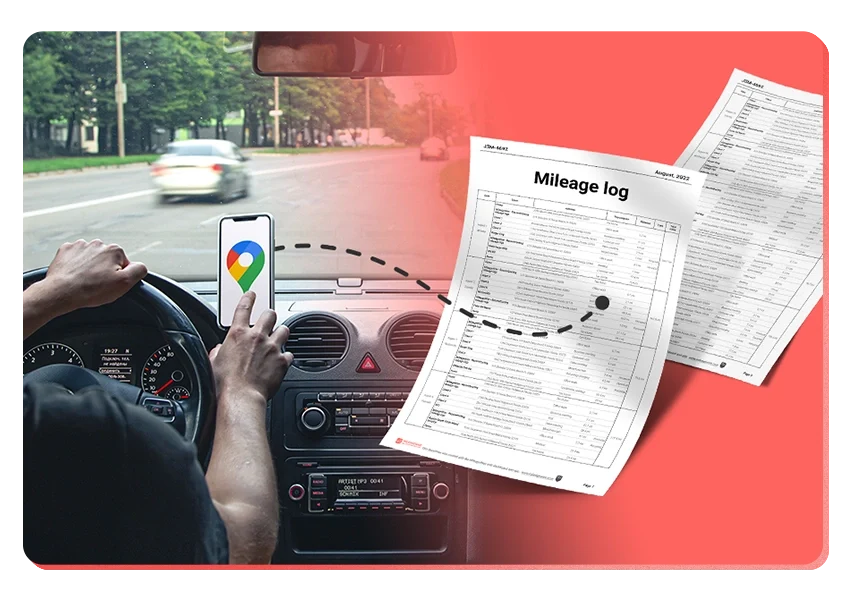
The key is accurate record-keeping. Without proper documentation, you risk losing your mileage deduction or paying tax fines during an audit. The IRS requires a simple mileage log showing:
- The starting and ending odometer readings of the year
- The date of each trip
- Starting and ending locations
- Purpose of the trip (business/charity/medical/moving/personal)
- Total miles driven
Without this, your deduction could be rejected in an IRS audit. That’s where the right tool makes all the difference.
How to Stop Overpaying Taxes with Automatic Mileage Tracking
Tracking miles manually is time-consuming and easy to forget. That’s why many business owners and gig workers use MileageWise, a mileage tracker app designed to automate the process and ensure every mile is logged correctly.
Why MileageWise?
- Mileage Tracker App – MileageWise automatically tracks your drives in the background, or lets you add and edit trips manually when you prefer control. It’s ad-free, privacy-focused, and built to create IRS-proof mileage logs without tech hassle.
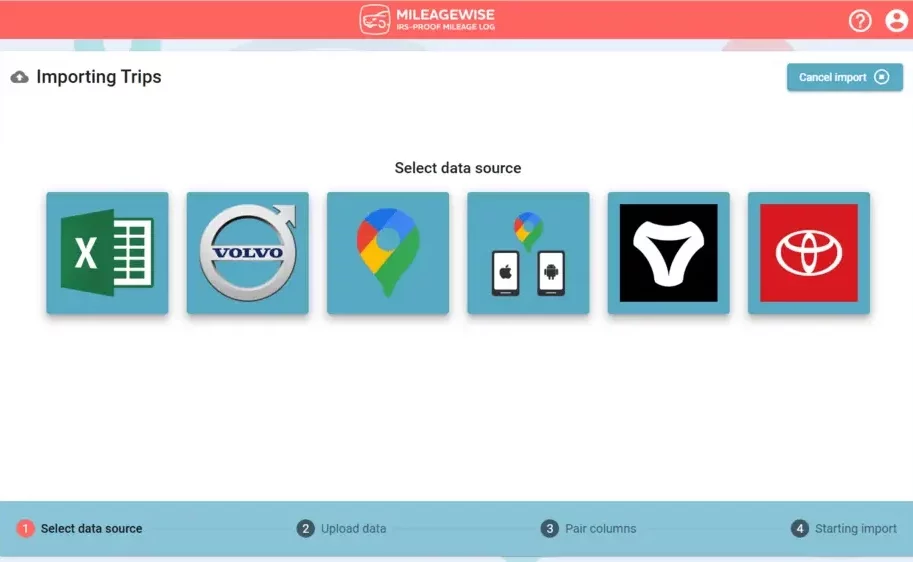
- Google Timeline Import Tool – Forgot to track your miles? MileageWise can import your Google Maps Timeline data and turn past location history into clean, structured trips. It’s the easiest way to recover missed mileage and avoid losing deductions when tax time comes.
- AI Wizard Mileage Log Generator – The AI Wizard rebuilds complete, IRS-compliant mileage logs from your trips in minutes instead of hours. It fills in gaps, organizes business vs. personal drives, and prepares audit-ready reports so you can focus on your work, not paperwork.
Imagine getting a bigger tax refund just by tracking your miles correctly. With an easy-to-use app, you can stop overpaying taxes and maximize your savings.
Start Tracking & Stop Overpaying Taxes Today
If you drive for work and aren’t tracking your mileage, you’re paying too much in taxes. Every mile you log can put more money back in your pocket.
Try MileageWise for free for 14 days. No credit card required!
FAQ
How do I know if I’m overpaying taxes?
You may be overpaying if you aren’t claiming all the deductions you qualify for, especially mileage. Missing receipts, poor record-keeping, or not tracking business expenses properly are common causes.
Can I get money back if I overpaid taxes?
Yes. If you overpaid, the IRS sends the extra money back to you as a tax refund. If you discover the overpayment later, you can file an amended return (Form 1040-X) to claim what you missed. The IRS generally allows amendments within three years.
MileageWise helps you reconstruct your past mileage so you can deduct what you are entitled to.
What are the most commonly missed tax deductions?
Mileage, home office expenses, phone/internet use, equipment, and business-related subscriptions are among the most overlooked deductions—especially for freelancers and gig workers.
How can I avoid overpaying taxes in the future?
- Adjust your tax withholding using Form W-4
- Track deductible expenses throughout the year
- Keep good records of business mileage
- Use tax software or a tax professional
- Review your deductions and credits yearly
Staying organized is the easiest way to avoid giving the IRS more than you owe.

Introducing the Google Timeline to Mileage Log Mobile App
We’re excited to share our latest development! You can now convert your Google Maps Timeline drives directly into an IRS-compliant mileage log right on your

DoorDash Tips and Tricks: Your Edge Over Competition
Last Updated: November 17, 2025 I’m excited to share the top DoorDash tips and tricks shared by YouTuber Pedro “Mr.BetonYou” Santiago. He collected and vetted the

8 Uber and Lyft Scams Every Driver Should Know
Last Updated: November 9, 2025 Driving for Uber or Lyft can be a rewarding gig, offering flexibility and the chance to meet new people. However,
SherpaShare Shutdown – What To Do Now?
Last Updated: October 7, 2025 SherpaShare was a service designed primarily for people who work as independent contractors, particularly those in the ride-sharing and delivery
Gas Mileage Tracker: Your Key to Savings
Last Updated: August 8, 2025 A gas mileage tracker helps drivers watch their vehicle’s fuel use, mileage, and related costs. You might want one to

How To Track Miles on iPhone: Find your Match
Last Updated: August 6, 2025 Looking to track miles on your iPhone? Whether it’s for fitness, personal use, or business tax deductions, your iPhone offers
Related Guides
Related Blogposts


It’s Finally Here! Google Maps Timeline Import from Mobiles
Transform your Trip Lists into Mileage Logs with MileageWise

Introducing the Google Timeline to Mileage Log Mobile App
We’re excited to share our latest development! You can now convert your Google Maps Timeline drives directly into an IRS-compliant mileage log right on your

DoorDash Tips and Tricks: Your Edge Over Competition
Last Updated: November 17, 2025 I’m excited to share the top DoorDash tips and tricks shared by YouTuber Pedro “Mr.BetonYou” Santiago. He collected and vetted the

8 Uber and Lyft Scams Every Driver Should Know
Last Updated: November 9, 2025 Driving for Uber or Lyft can be a rewarding gig, offering flexibility and the chance to meet new people. However,
SherpaShare Shutdown – What To Do Now?
Last Updated: October 7, 2025 SherpaShare was a service designed primarily for people who work as independent contractors, particularly those in the ride-sharing and delivery
Gas Mileage Tracker: Your Key to Savings
Last Updated: August 8, 2025 A gas mileage tracker helps drivers watch their vehicle’s fuel use, mileage, and related costs. You might want one to

How To Track Miles on iPhone: Find your Match
Last Updated: August 6, 2025 Looking to track miles on your iPhone? Whether it’s for fitness, personal use, or business tax deductions, your iPhone offers

Introducing the Google Timeline to Mileage Log Mobile App
We’re excited to share our latest development! You can now convert your Google Maps Timeline drives directly into an IRS-compliant mileage log right on your

Was Your Google Timeline Deleted? Here’s What Happened:
Last updated: November 20, 2025 If you recently opened Google Maps and noticed your Timeline was deleted or partially missing, you’re not alone. In this

It’s Finally Here! Google Maps Timeline Import from Mobiles
Struggling to Manage Your Trips After Google’s Timeline Update? If you’re reading this, you’ve likely encountered the recent update affecting Google Maps Timeline. With Timeline
Transform your Trip Lists into Mileage Logs with MileageWise
Last Updated: October 1, 2025 Do you have a list of monthly trips from a data source like Excel or Google Timeline, but need to
How to Download Google Timeline Data: A Guide
Google Timeline Import Hub Last Updated: October 30, 2025 Want to download Google Timeline data? This guide shows you how to extract your location history
How to Export Google Maps Timeline: Get Your Data
Google Timeline Import Hub Last Updated: October 29, 2025 It can be tricky to export Google Maps Timeline data after Google’s recent updates. Many users
Google Maps Mileage Tracker: From Timeline to Mileage Log
Google Timeline Import Hub Last Updated: October 29, 2025 If you’re an active user of Google Maps Timeline you likely already know how convenient it
Timeero
Table of Contents Timeero Timeero is a time, location, and mileage tracking app designed for businesses and teams in the United States. It helps employers
Milewise by Allstate
Table of Contents Milewise by Allstate Milewise by Allstate is a pay-per-mile car insurance program offered by Allstate Insurance in the United States. It’s designed
Hurldr
Table of Contents Hurdlr Hurdlr is a finance and expense tracking app designed for self-employed professionals, freelancers, and gig workers in the United States. It