Introducing the Google Timeline to Mileage Log Mobile App

We’re excited to share our latest development!

You can now convert your Google Maps Timeline drives directly into an IRS-compliant mileage log right on your phone.

No file transfers. No desktop tools. Everything happens in our brand-new Google Timeline to Mileage Log mobile app.

Who Is This App For?

Many people don’t realize how valuable their Google Maps Timeline can be until they need a mileage log. Here are the most common situations when the app becomes a lifesaver:

1. If You Are Looking For a Mileage Tracker Alternative

Drivers can now turn that existing location history into an IRS-proof mileage log in minutes. Perfect for:

  • Users who are fed up with constantly checking if their mileage tracker app is recording, annoyed by missed and inaccurate entries, or tired of swiping to classify business/personal trips after every stop.
  • Drivers who want one less app accessing their live location and wasting battery or data.
  • Anyone who wants to use the Timeline data they already have

2. If You Need a Retroactive Mileage Log

If you have an incomplete mileage log or have no records at all, your Google Maps Timeline may be the only source that still shows where you’ve been. Our app converts that Timeline into an IRS-compliant mileage log you can use for:

  • Accurately reconstructing past mileage that you can deduct at tax season
  • Creating bulletproof documentation that supports your mileage claim if you receive an IRS audit, even for past years.

Why This Matters

A proper mileage log can be the difference between saving thousands at tax time and losing your deduction entirely. Without one, the IRS may deny your claim or issue penalties. Whether you want a tracker-free way to log your miles or you need to access past trips for a mileage log, the new Google Timeline to Mileage Log app has you covered — on your mobile device.

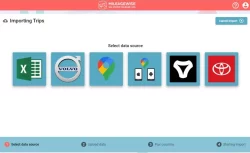
Our Trusted Google Maps Timeline Import Feature

For years, thousands of users have relied on our Google Maps Timeline Import feature to create accurate mileage logs. It’s been one of our signature tools and a core part of how we help drivers, freelancers, and businesses stay compliant.

Adapting to Google’s Timeline Update

When Google moved all Timeline storage from the cloud to users’ phones, we ensured continuity by developing our system to process mobile-based Timeline files. This allowed users to keep using the desktop-based feature without disruption, while Google’s storage changes settled into place. This transition paved the way for something even better…

Introducing the Mobile Timeline Import App

Once Timeline became phone-bound, the next step was clear: the feature needed to be available on mobile devices. So we built a dedicated Google Timeline to Mileage Log mobile app, bringing the same proven functionality you’ve trusted for years directly to your device.

No file transfers, no extra steps.

Available on Android — Coming Soon to iOS

We’re excited to bring you a faster, more convenient way to convert your Timeline into IRS-Proof mileage logs. Enjoy!

Get our New Google Timeline to Mileage Log App

Google Play store

Coming soon to the App Store…