IRS Mileage Log Guide


Home » IRS-Compliant Mileage Log » Excel Mileage Log
Last Updated: July 6, 2026
An Excel mileage log template is a digital file that helps you track vehicle trips for mileage tax deduction, reimbursements, and fuel management. It contains formulas and simple setups to automatically handle calculations like total miles, reimbursement amounts, and summary reports.
This guide gives you a free mileage tracker spreadsheet and explains what these templates are, how they work, and how they can benefit you.
Spoiler: it’s a valuable tool, but in my experience, you will forget to enter a stop at least once a day, and you will end up spending your evenings tracing back your steps. Unless you are that type A personality in your friend group.
Get your Free Mileage Log Templates for Excel here:
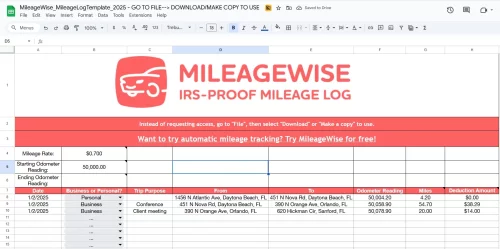
Table of Contents
What is an Excel Mileage Log?
An Excel mileage log is just a spreadsheet designed to record your car trips. Think of it as a digital logbook for your vehicle’s mileage. Instead of writing everything down by hand, you type it into Excel. The magic happens when the spreadsheet uses built-in formulas. These formulas automatically calculate things like how many miles you’ve driven and how much you can claim for those miles. This can save you a ton of time and prevent errors.
But there are plenty of resources and video help if you want to assemble your mileage log yourself.
Key Features of a Digital Mileage Log Spreadsheet
These digital logbooks come packed with features designed to make mileage tracking simple and accurate. Here’s what you’ll typically find:
- Core Columns for Trip Details: You’ll input key information like the date of your trip, your starting and ending locations, and odometer readings (start and end). The template then automatically figures out the miles you drove.
- Purpose Selector: Most templates include a dropdown menu where you can easily mark each trip as business, personal, or commuting. This helps separate your deductible miles from non-deductible ones.
- Reimbursement Rate Automation: For business trips, the template often applies a reimbursement rate, like the current IRS business mileage rate.
- Total Calculations: At the end of the day, week, or month, the spreadsheet can quickly sum up all your business miles and total reimbursement.
- Customization Options: You can often adjust units (kilometers or miles), change colors, add fuel costs and mpg tracking, or keep multiple tabs for more vehicles.
- Compatibility: These templates work on most computers, whether you use a Mac or Windows. They are also easy to fill out and print if you need a paper copy.
Why Using an Excel Mileage Log Matters
Using a mileage log template is not just about following IRS rules. It can directly affect your tax savings, organization, and peace of mind. When you track trips consistently, you can maximize your mileage deduction because every business drive is recorded instead of relying on rough estimates or memory. A well-organized mileage tracker spreadsheet also protects you if the IRS ever questions your deductions, since clear and detailed records provide solid proof of your business mileage.
At the same time, mileage logs are useful beyond taxes. For businesses that manage multiple vehicles, small business mileage logs offer valuable insights into how vehicles are used, helping managers identify unusual driving patterns and improve route planning.
Ensuring IRS Compliance with Your Mileage Log
For tax purposes, the IRS is clear about what you need to record for business mileage deductions. Your mileage log needs to be accurate and detailed. It is best to complete each entry after every arrival, but at the latest by the end of the day to keep it contemporaneous.
Make sure your chosen mileage log spreadsheet includes these fields:
- Date of the Trip: When did you drive?
- Purpose of the Trip: Was it for business, personal, or commuting? Be specific about the business reason.
- Starting and Ending Locations: Where did you start, and where did you finish?
- Total Miles Driven: How far did you go?
- Odometer Readings: The starting and ending odometer readings for each trip, to determine trip distance.
Logging personal trips in an IRS mileage log is not mandatory. However, I recording them, because it helps show a complete picture of your vehicle use, so every mile is accounted for – in case the IRS ever comes knocking.
Beyond Excel: Streamlining Mileage Tracking with MileageWise
While a mileage log spreadsheet is a great starting point, the world of mileage tracking has evolved. If you’re looking for even more accuracy, automation, and peace of mind, especially when it comes to IRS compliance, dedicated solutions like MileageWise offer significant advantages. Our users report a 6x – 60x increase in their mileage deductions after switching to MileageWise, compared to manually tracking in spreadsheets.
MileageWise takes the core benefits of an Excel template and supercharges them with automation. It’s designed to make mileage tracking effortless and audit-proof:
MileageWise Mileage Tracker App Top Features
- Quick Setup: Start tracking in minutes without spending time creating or customizing mileage log templates.
- Automatic Mileage Tracking: Record your daily drives automatically with several recording modes, helping you capture trips more accurately than manual logs.
- Flexible Routing/Distance Calculations: Choose between tracking exact routes or calculating optimized distances based on your preferences.
- Backup Mileage Capture: Ensures trips begin from the correct starting point, helping prevent missed or incomplete logs.
- Ad-Free & Privacy-Focused: Track your mileage without ads or concerns about your driving data being sold or shared.
- Expense Tracking Integration: Keep mileage and business expenses organized in one place instead of managing multiple spreadsheets.
- Routing Integration with Waze: Use Waze for navigation while MileageWise records your trips quietly in the background.
- Web Dashboard access for advanced editing and importing features
- Dedicated Support: Access knowledgeable customer support whenever you need help setting up or managing your mileage records.
Try MileageWise for free for 14 days. No credit card required!
Automatic Mileage Tracker App


⭐⭐⭐⭐⭐
As a home healthcare nurse, I spend most of my workday driving between patients’ homes. For years, I relied on an Excel mileage log to track my business miles. At first, it seemed like a simple solution. I created a spreadsheet, planned to update it every day, and thought it would keep my records organized.
The problem was consistency. After a long day of driving, the last thing I wanted to do was open my laptop and remember every trip I made. Some days I forgot entirely, and other times I tried to fill in the details later from memory. My Excel mileage tracker spreadsheet quickly became incomplete and unreliable.
I realized that if I wanted accurate records, I needed something that worked automatically. That’s when I switched to the MileageWise mileage tracker app. Now my trips are recorded as I drive, so I no longer worry about forgetting to log miles. Instead of guessing routes or distances later, I have a clear and organized mileage log ready whenever I need it.
Get Started with Better Mileage Tracking Today
Tracking your mileage doesn’t have to be a chore. A good mileage log template Excel sheet is a good start, but investing in a dedicated mileage tracker app can save you a whole lot of time, money, and stress, especially come tax season.
FAQ
What columns should a good mileage log include?
At minimum: date, start/end locations, business purpose, and miles. Many templates also include odometer start/end, client/project, vehicle, rate, reimbursement amount, and notes.
Is an Excel mileage log acceptable for IRS or employer reimbursement?
Yes, if it’s complete, accurate, and kept up to date. The IRS wants date, miles, destination, and business purpose. Your employer may have extra rules, so check their policy.
How do I set the reimbursement rate in an excel mileage tracker template?
Not for every trip, but miles per trip are required. Odometer readings help verify totals and are commonly used. Record your vehicle’s odometer at the start and end of each year.
Where can I download a free Excel mileage log template?
Microsoft Office templates, Vertex42, and Smartsheet offer trusted free options. Many accounting apps and blogs (e.g., QuickBooks, Everlance, MileageWise) also share downloadable Excel files.
How often should I update the Excel mileage spreadsheet, and do I need a new one each year?
Update it after each trip or at least daily. Keep backups and retain records for at least three years after filing your return. Start a fresh workbook each tax year.